By CroquetClaude · 4 min read · First added 7 Oct 2026
The handicap card is live on myCroquet
Members can now see and change their own handicap in myCroquet. This is what members and club captains can do, and what changed after the committee test.

Members can now change their own handicap index in myCroquet after a game. The club captain keeps an eye on big changes.
The handicap card shows a member's handicap and index for Golf, Association and Ricochet. The index is the number that sits behind a handicap. The handicap card is the member's own handicap screen, where the index is changed. You can open it at myCroquet handicap card.
How clubs do it
- The member opens myCroquet and goes to the handicap card.
- After a game, the member enters the new index.
- A small change saves straight away.
- For a change of more than 50 index points, the screen shows "That's a large change! Tell us what happened." The member types a short reason, such as "won three games at the Gold Coast Open", and the change saves. It does not save without a reason.
- The club captain sees the change and the reason, then presses "Looks right" to clear it or "Put it back" to restore the old number.
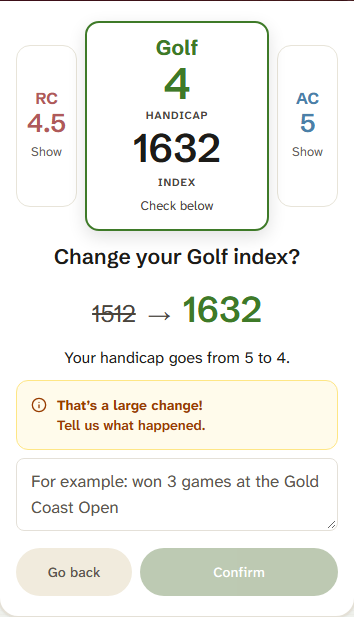
| Small change | Large change (more than 50 index points) | |
|---|---|---|
| Reason needed | No | Yes, a short reason |
| When it saves | Straight away | Straight away, once the reason is typed |
| Who sees it | The member | The member and the club captain |
Each handicap number has its own trigger point, which is a set index number. The handicap number changes only when the new index reaches the trigger point of a different handicap number. Until then it stays the same.
Why large changes save first
This works like the paper handicap card. The player keeps their own card and reports their own number. CAQ relies on members acting in good faith, so volunteers do not have to approve each change before it counts.
What a club captain can do
A captain can set the handicap index of any member of their club.
| Who | How they get the tools |
|---|---|
| Club captain | Automatically |
| Club secretary | Automatically |
| Another member | Given by the club's President or Secretary through Gifting in myCroquet |
The secretary also holds the Member List, where the club keeps its members' details, so a secretary may find that page useful. You can read more in The Member List in myCroquet.
Tournament sheets
| Way | What happens |
|---|---|
| Tournament sheet | Players fill in the sheet, as they always have. At the end, a photo of it goes to CAQ, and the records are updated from it. |
| In myCroquet | Players change their own index. |
Nobody needs to do anything special, and either way is fine. Tournament managers do not need to type the sheet or fill it in before the event. See Using the Tournament Handicap Record form.
Records brought across
All 2,035 handicap records were moved from RevSport to myCroquet. Of these, 156 (8%) had a handicap and an index that did not match, and they were corrected. A member whose handicap looks wrong can change it, or wait for the next tournament sheet.
Help
Members can email hello@croquetqld.org with what they saw, and a screenshot helps. Reports of anything confusing or hard to find are welcome too.
Where this comes from
Comments
Ask a question or tell us what worked at your club. Replies show under your comment.